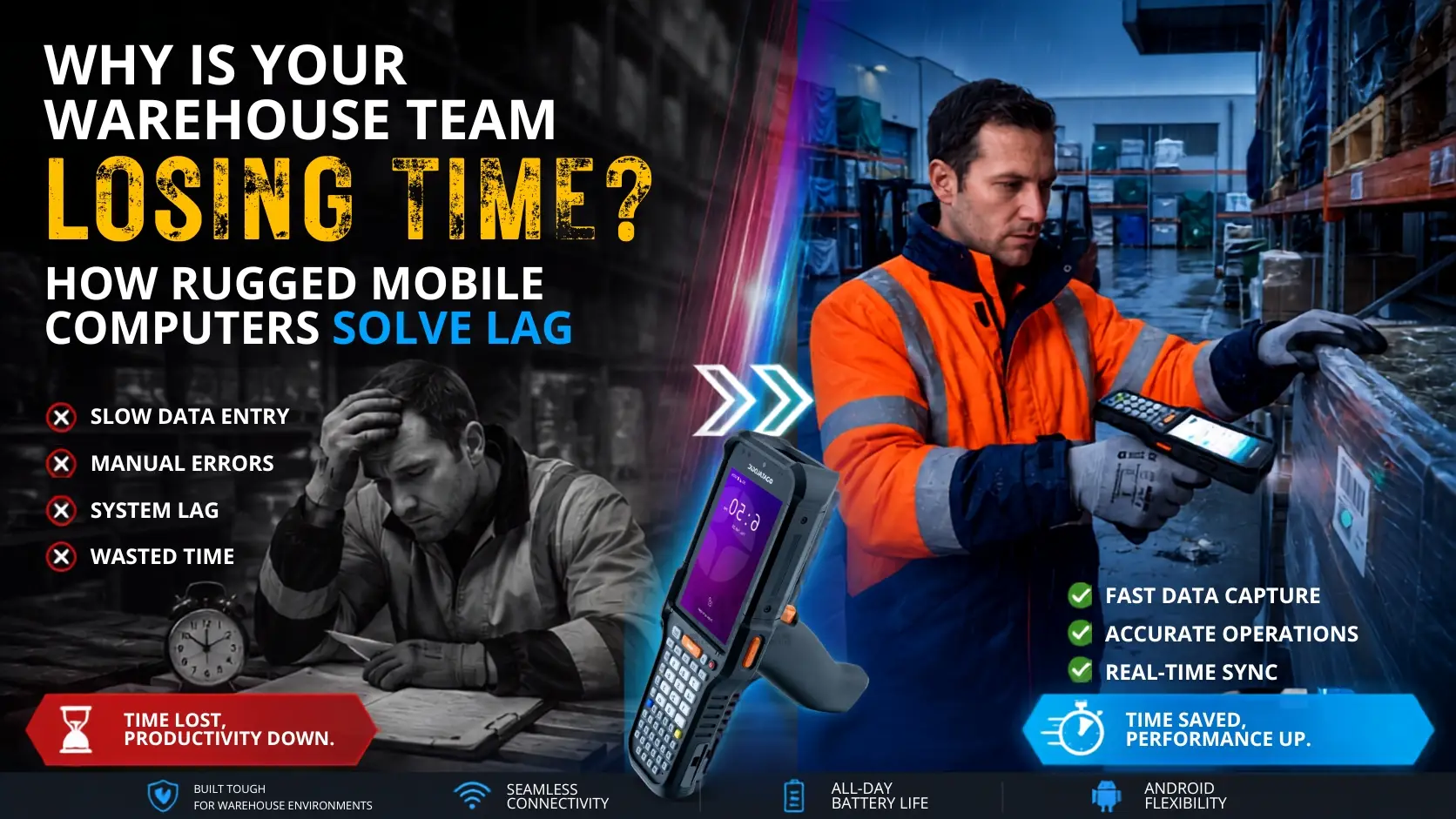
Warehouse teams in the UAE often lose time for one simple reason: data capture is too slow, inconsistent, or unreliable. In many operations, the real bottleneck is not labour. It is the device stack behind daily tasks such as receiving, put-away, picking, replenishment, cycle counting, and inventory audits. A lagging Mobile Computer PDT, weak scan performance, poor Wi-Fi roaming, short battery runtime, or non-rugged hardware can slow the entire warehouse workflow.
A Mobile Computer PDT is a dedicated handheld data terminal built for barcode-driven operations. Unlike a consumer smartphone with a scanning app, it combines an enterprise-grade scan engine, rugged construction, long-shift battery design, and stable integration with WMS and ERP platforms. For warehouses in Dubai, Abu Dhabi, Sharjah, and across the UAE, that difference directly affects speed, uptime, and inventory accuracy.
This guide explains how to identify the real causes of warehouse lag and how to solve them step by step. If you are evaluating a warehouse mobile computer in UAE, comparing performance across different device classes, or planning a broader Mobile Computer PDT deployment for UAE warehouses, the goal is the same: faster scans, fewer delays, and cleaner inventory data.
Why warehouse lag happens in the first place
Warehouse delay is usually cumulative. A one-second pause may not seem serious on a single transaction, but repeated across hundreds of scans, it becomes a major productivity issue. Lag often appears in the following ways:
- Slow barcode decoding on damaged, faded, or shrink-wrapped labels
- Delays between scan confirmation and WMS or ERP update
- Wi-Fi disconnections while moving between aisles, racks, or loading zones
- Extra rescans caused by poor scan angles or weak imaging performance
- Battery drops or mid-shift charging interruptions
- Device failure in dusty, hot, or high-impact warehouse conditions
In UAE warehouse environments, these issues are common where devices operate around concrete floors, forklift movement, dust exposure, and long shifts.
Step 1: Map where time is actually being lost on the warehouse floor
Start with process observation before replacing hardware. Follow one receiving task, one picking wave, and one stock-count routine from start to finish. Document exactly where operators pause. Typical delay points include waiting for a screen refresh, rescanning poor labels, reconnecting to Wi-Fi, re-entering quantities, or walking back to a workstation because the handheld did not post data correctly.
Ask a direct question: Why does my current Mobile Computer PDT or warehouse scanning device lag when updating inventory in our ERP or WMS? The answer is usually a mix of older processors, limited memory, poor wireless roaming, inefficient middleware, or devices that were never designed for high-frequency scan-and-post workflows.
Measure using practical warehouse events instead of generic IT metrics. Useful checkpoints include:
- Trigger press to barcode decode
- Decode to confirmation tone or visual response
- Confirmation to transaction upload
- Upload to visible update in the WMS or ERP screen
This gives operations and IT teams a shared baseline before any procurement or integration changes are made.
Common mistake to avoid
Do not blame operators before validating the workflow. If workers must rescan because the device misses labels at awkward angles or loses connection in deep-rack aisles, the problem is system design, not user discipline.
Step 2: Identify the technical sources of lag, not just the symptoms
Lag during picking, stock counting, and inventory updates usually comes from a small set of technical causes.
1. Scan engine limitations
Low-performance imagers often struggle with damaged labels, low-contrast barcodes, reflective packaging, or long-range bin locations. That leads to rescans, slower movement, and user frustration.
2. Underpowered device hardware
Older or entry-level Android terminals can slow down when running WMS screens, browser forms, and background synchronisation at the same time. Users experience this as input delay, freezing, or app instability.
3. Weak Wi-Fi roaming
Many large facilities have coverage but still suffer roaming gaps when users move between access points. In practice, the device looks connected, but transactions pause or time out during movement.
4. Wrong hardware class for the environment
Consumer-grade devices or lightly rugged units often fail faster in warehouse conditions. Dust, vibration, repeated drops, and heat exposure quickly affect uptime.
5. Poor software and transaction design
Not all lag is caused by the handheld itself. Sometimes the bottleneck sits in the application layer, middleware, API design, or WMS transaction flow. That is why end-to-end testing matters.
| Problem on the floor | Likely root cause | Operational effect | What to specify |
|---|---|---|---|
| Slow scan response | Weak scan engine or poor damaged-label performance | Rescans and longer pick times | Industrial 1D/2D scan engine with fast decode |
| Inventory update delay | Poor Wi-Fi roaming or application latency | Stock mismatch and user frustration | Enterprise Wi-Fi, tuned middleware, offline buffering |
| Frequent device replacement | Consumer-grade hardware in harsh conditions | Downtime and higher support cost | Rugged, sealed, drop-tested chassis |
| Mid-shift shutdowns | Short battery life or non-swappable battery design | Interrupted counting and picking | Hot-swappable or long-shift battery architecture |
| Operator fatigue | Heavy or awkward form factor | Slower scans later in the shift | Ergonomic handheld or pistol-grip option |
Practical tip: Capture logs from the device, Wi-Fi network, and WMS during the same shift. Without that three-layer view, companies often replace hardware when the bigger issue is roaming behaviour or transaction design.
Step 3: Replace the wrong device class with a true rugged Mobile Computer PDT
If your team is relying on smartphones with scanning apps, ageing handheld terminals, or basic touch devices, the most effective fix is often to move to a true rugged Mobile Computer PDT. These devices are purpose-built for AIDC workflows. AIDC means automatic identification and data capture, covering barcode, RFID, and related technologies that reduce manual entry in warehouses.
What is the difference between a smartphone and a dedicated Mobile Computer PDT? A smartphone can display an app and support light scanning. A PDT is designed for repeated enterprise scanning, all-day uptime, stable trigger-based workflows, replaceable batteries, rugged accessories, device management, and warehouse-grade durability.
That difference matters when a team handles high transaction volumes across receiving, picking, dispatch, and stock verification. Modern Android-based units from Zebra, Datalogic, Honeywell, and Newland support enterprise deployment, remote management, and broader peripheral compatibility.
If you want a touch-first workflow, a full-touch mobile computer may be suitable. For product-level evaluation, review options such as the Datalogic Falcon X60 rugged mobile computer, the Zebra TC27 rugged 5G Android mobile computer, the Datalogic Memor K20/K25 rugged Android mobile computer, or the Newland MT93 Megattera rugged Android mobile computer.
Common mistake to avoid
Do not choose a Mobile Computer PDT based only on purchase price. UAE procurement teams should review total cost of ownership because a cheaper device that fails more often, requires more charging breaks, or lacks local repair support can become the more expensive option over time.
Step 4: Specify the features that remove delay in real UAE warehouse conditions
Once you have selected the correct device category, the next step is to build a practical specification. A good Mobile Computer PDT UAE specification should reflect actual warehouse conditions, not only brochure features.
Ruggedness and environmental fit
Start with the physical environment. Define required IP sealing, drop resistance, temperature tolerance, and durability on concrete floors. In UAE warehouses, especially those with heat exposure or dusty operating areas, these are operational requirements.
Battery design for long shifts
Check whether the battery can support your shift pattern and whether it is hot-swappable or easily replaceable. This matters in stock counting, replenishment, and dispatch workflows where charging interruptions directly affect throughput.
Scan performance for your real labels
Your device should match the labels and distances used in your warehouse, including shelf labels, pallet labels, supplier barcodes, wrapped cartons, and high-rack bin locations. A scanner that works well in a demo may still struggle on real warehouse media.
Form factor and ergonomics
A lightweight handheld may suit cycle counting and put-away. A pistol-grip device may be better for repetitive picking. The right form factor helps reduce fatigue over long shifts and improves consistency during scanning.
Connectivity and management
Enterprise Wi-Fi support, stable roaming, Android lifecycle control, and device management tools are important when the WMS depends on constant transaction flow. Reliable connectivity is especially important across loading bays, deep aisles, mezzanine areas, and fast-moving warehouse zones.
Practical tip: Run a live pilot in the hottest zone, the farthest aisle, and the busiest shift. Desk-based testing will not reveal real decode behaviour through shrink wrap, glove operation, or roaming delays around moving equipment.
Step 5: Integrate the Mobile Computer PDT properly with WMS, ERP, and daily operations
A rugged handheld alone will not remove lag unless the integration layer is well designed. Build the deployment around transaction flow: receiving into Oracle or SAP, location confirmation in the WMS, exception handling, label reprint, and offline buffering when the network drops.
Can Mobile Computer PDT devices integrate with Oracle, SAP, or custom warehouse software? In most cases, yes. Integration can happen through Android applications, browser sessions, terminal emulation, middleware, or APIs. The important point is not only whether a connection is technically possible, but whether the workflow performs fast enough in daily use.
Map each warehouse process to the simplest possible user screen. Reduce taps, minimise keyboard entry, and use barcode validation for item, location, lot, and quantity wherever possible. The goal is to remove bottlenecks across the workflow, not just replace old hardware.
Support planning is equally important before go-live. What repair and AMC options should buyers in the UAE and GCC check before deploying Mobile Computer PDT devices? The answer includes local diagnosis, spare handling, preventive maintenance, battery replacement planning, and swap support. Warehouses cannot afford picking delays because a handheld has failed without backup or service coverage.
For businesses planning a broader rollout, it is also useful to evaluate available mobile computers in UAE together with barcode scanners, printers, labels, and support services so the full warehouse workflow is aligned.
Mobile Computer PDT selection checklist for UAE warehouses
- Confirm the exact lag points through process observation and timestamp logging.
- Validate scan performance using your real labels and actual working distances.
- Test Wi-Fi roaming in deep aisles, loading bays, and mezzanine levels.
- Specify ruggedness, battery type, and ergonomics for your shift pattern.
- Verify WMS or ERP integration method before ordering devices.
- Plan charging, battery rotation, staging, and user training.
- Secure AMC, repair, and replacement support locally in the UAE.
Technowave International supports Mobile Computer PDT UAE requirements with hardware supply, installation support, software integration, AMC, repair, and after-sales service across the UAE and wider GCC. If your warehouse is still losing time to lagging handhelds, review the workflow, device class, and support model together.
FAQ
What is a Mobile Computer PDT and how is it used in warehouses?
A Mobile Computer PDT is a handheld data terminal used for barcode-driven tasks such as receiving, put-away, picking, stock counting, replenishment, and dispatch confirmation. It combines a scanner, operating system, wireless connectivity, and warehouse software access in one rugged device.
Why are rugged Mobile Computer PDT devices better than smartphones for warehouse operations?
Rugged units are designed for repeated scanning, long shifts, glove use, concrete-floor drops, and industrial wireless performance. Smartphones can support light scanning tasks, but they are usually less suitable for continuous warehouse use.
How does a Mobile Computer PDT reduce delays in stock counting and picking?
It reduces manual entry, decodes labels faster, and posts transactions directly to the WMS or ERP. When integrated correctly, it also cuts rescans, paper-based reconciliation, and trips back to fixed workstations.
Which UAE industries benefit most from Mobile Computer PDT deployment?
Logistics providers, retail distribution centres, pharmaceuticals, manufacturing, spare-parts warehouses, e-commerce fulfilment operations, healthcare stores, and industrial sites all benefit from faster and more accurate item and location capture.
Can Mobile Computer PDT devices integrate with warehouse management systems and ERP software?
Yes. They commonly connect to Oracle, SAP, Microsoft, and custom warehouse platforms through Android apps, browser interfaces, APIs, middleware, or terminal emulation. Workflow validation is the key step.
How do rugged PDT devices handle UAE warehouse dust and heat?
Purpose-built models use sealed housings, industrial components, and tested operating ranges designed for demanding environments. Buyers should check IP rating, drop specification, battery design, and environmental guidance before selection.
What should buyers in the UAE look for before choosing a Mobile Computer PDT?
Key points include scan engine quality, Wi-Fi roaming performance, battery design, ruggedness, ergonomics, software compatibility, local service support, and the availability of AMC and repair options.
Which Mobile Computer PDT models are commonly evaluated for UAE warehouses?
Commonly reviewed options include enterprise handhelds and rugged touch computers from leading brands. Examples include the Datalogic Falcon X60 for warehouse-focused workflows and the Zebra TC27 for mobile field and light industrial use cases.
Related Articles
- Datalogic Falcon X60 Rugged Mobile Computer
- Mobile Computer PDT Guide for UAE Warehouses
- Zebra TC27 Rugged 5G Android Mobile Computer
- Mobile Computers UAE
- Full Touch Mobile Computer
Mobile Computer PDT UAE for Faster Warehouses
See how the right Mobile Computer PDT can reduce warehouse lag, errors, and downtime for faster inventory and logistics operations in the UAE.